Skip to content
  • Qbit IT Services
    • IT Support Perth
      • Managed IT Services Perth
      • Service Bank
      • How to Evaluate a new MSP
      • Managed Services Kalgoorlie
      • Internal IT Department Support
      • Office IT Relocations
      • Book your IT Assessment Perth
    • IT Solutions
      • Cabling & Physical Security
      • SharePoint
      • Microsoft 365
      • Hardware & Software
      • Infrastructure Upgrades
      • Business Continuity & Backups
      • Business Phone Solutions
      • Business Mobile Phone Plans
      • Business Grade NBN
      • Data Storage
      • Web Hosting Services
      • Cloud Computing Perth
    • Cyber Security
      • Managed Security Services Perth
      • SMB1001 Certification
      • Essential Eight Cybersecurity Framework
      • Notifiable Data Breaches
      • Cyber Security Tools
      • DISP Cybersecurity Support
  • Industry Specialist
    • Professional Services
      • Accounting
      • WA State Government (CUAICTS2021)
      • Legal Practices
      • Not For Profit
      • Real Estate
      • Small Business
      • Corporate IT Support
    • Industry & Infrastructure
      • Engineering
      • Mining
      • Construction
      • Architecture
    • Medical
      • Aged Care Facilities
      • Dental IT Support
      • Medical IT Support
  • About Us
    • Westminster Office
    • West Perth Office
    • Frequently Asked Questions
    • Our Values
    • Client Testimonials
    • Case Studies
    • Our Partners
    • Community and Social Responsibility
    • Awards & Certifications
    • Our People
    • News & Blogs
  • IT Specials
  • Client Tools
Contact us
  • Qbit IT Services
    • IT Support Perth
      • Managed IT Services Perth
      • Service Bank
      • How to Evaluate a new MSP
      • Managed Services Kalgoorlie
      • Internal IT Department Support
      • Office IT Relocations
      • Book your IT Assessment Perth
    • IT Solutions
      • Cabling & Physical Security
      • SharePoint
      • Microsoft 365
      • Hardware & Software
      • Infrastructure Upgrades
      • Business Continuity & Backups
      • Business Phone Solutions
      • Business Mobile Phone Plans
      • Business Grade NBN
      • Data Storage
      • Web Hosting Services
      • Cloud Computing Perth
    • Cyber Security
      • Managed Security Services Perth
      • SMB1001 Certification
      • Essential Eight Cybersecurity Framework
      • Notifiable Data Breaches
      • Cyber Security Tools
      • DISP Cybersecurity Support
  • Industry Specialist
    • Professional Services
      • Accounting
      • WA State Government (CUAICTS2021)
      • Legal Practices
      • Not For Profit
      • Real Estate
      • Small Business
      • Corporate IT Support
    • Industry & Infrastructure
      • Engineering
      • Mining
      • Construction
      • Architecture
    • Medical
      • Aged Care Facilities
      • Dental IT Support
      • Medical IT Support
  • About Us
    • Westminster Office
    • West Perth Office
    • Frequently Asked Questions
    • Our Values
    • Client Testimonials
    • Case Studies
    • Our Partners
    • Community and Social Responsibility
    • Awards & Certifications
    • Our People
    • News & Blogs
  • IT Specials
  • Client Tools
News & Blogs

How to Clean Up Your Outlook Mailbox and Free Up Space

Fabio Suffell

Your Simple Guide to a Faster, Smarter, and More Efficient Inbox

Running a business means your Outlook mailbox probably fills up before you know it. Whether you’re a business owner or an employee, keeping your mailbox tidy is not just about being organised, it helps with search performance, reduces clutter, and can save you money by avoiding unnecessary Office 365 license upgrades. In this blog, we’ll break down why Outlook mailbox cleanup matters, how to do it efficiently, and share a few tips to keep things running smoothly. Plus, we’ll show you how Qbit IT Solutions can make your life easier with professional IT support and cyber security guidance. If you’ve ever thought ‘my mailbox is full’, ‘how do I empty it’, dealt with a ‘mailbox full’ or ‘mailbox is full’ warning, these tips will help you understand how to clean your email inbox effectively.

Why Mailbox Cleanup Matters

It’s easy to let old emails pile up, especially when the day-to-day gets busy. But over time, a crowded Outlook mailbox creates problems. Searching for important messages gets slower, your overall Outlook performance drops, and you risk running out of storage. This can force you to upgrade your Office 365 license earlier than you need to, adding unnecessary expenses to your business. Keeping your mailbox clean means faster searches, improved productivity, and fewer headaches for your IT team.

Common Outlook Issues Caused by a Full Mailbox

  • Slow or unresponsive searches
  • Delayed sending and receiving of emails
  • Error messages about mailbox size limits
  • Inability to back up emails or access archived data

By regularly cleaning up your Outlook mailbox, you minimise these issues and keep your business communications flowing smoothly.

Why It’s Important: The Real Benefits of Cleanup

1. Improved Search Performance

A streamlined mailbox makes searching for important information faster and more reliable. Outlook’s search function works best when it doesn’t have to sift through thousands of unnecessary emails.

2. Storage Savings

Every email, attachment, and calendar invite takes up space. By deleting what you don’t need, you can avoid maxing out your allocated storage, which means you won’t be forced into a higher Office 365 plan before you’re ready.

3. Avoiding Unnecessary Office 365 License Upgrades

Once your mailbox hits its limit, Office 365 will prompt you to upgrade your license. Proactive mailbox cleanup helps you make the most of your current plan and keeps costs down.

4. Other Advantages

Cleaning up your mailbox also reduces the risk of cyber security threats. Old emails with attachments can become targets for cybercriminals, so regularly removing them helps protect your data and your business reputation.

Quick Tip: Use Outlook Online for Bulk Deletions

Deleting large volumes of emails can be much easier in Outlook Online. The web version lets you quickly select and remove hundreds or thousands of emails at once, which is often quicker and more reliable than the desktop app. Just log in through your browser, head to the folder you want to clean up, and use the ‘Select All’ feature to speed things up.

Step-by-Step Guide: How to clean outlook email inbox

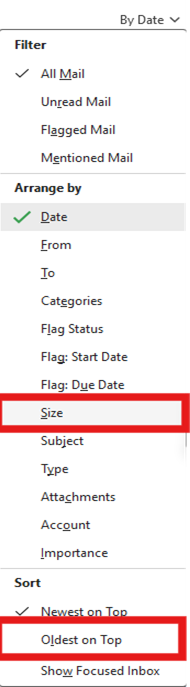
  1. Sort Emails by Size

Sort your inbox, Sent Items and other folders by size to quickly identify the biggest space hogs. In Outlook, click on ‘Sort by’ and choose ‘Size’. Focus on deleting emails with large attachments first, as these make the biggest impact on your storage.
Blog1


2.    Remove Unnecessary Attachments

Attachments take up more space than text emails. For important documents, save them to SharePoint, OneDrive, or your local drive, then delete the email or remove the attachment. This keeps your mailbox lean while ensuring you don’t lose valuable files.

3.    Unsubscribe from Unwanted Newsletters

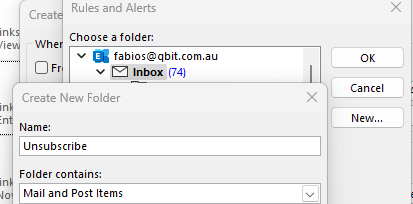
Automate your inbox by setting up rules to move or delete newsletters, promotions, or notifications you no longer need. Go through your subscriptions and hit ‘Unsubscribe’ where possible to reduce ongoing clutter.
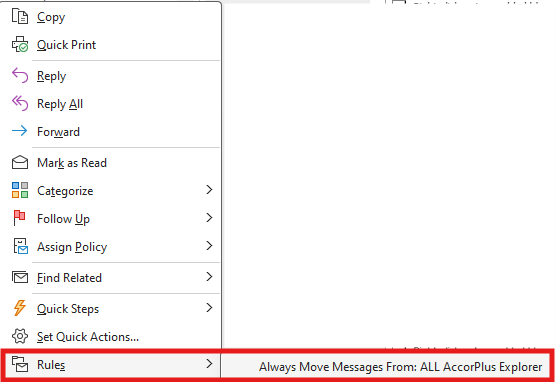
Blog2

Create an Unsubscribe folder

Blog3

Click advanced options

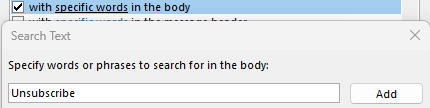
Click with specific words in the body and type unsubscribe and click add.Blog4Click through and add other conditions if you want to and then select run this rule now and finish.
 

4.    Manage Ongoing Attachments

Make it a habit to save important attachments outside your mailbox and clear them out regularly. Consider using Microsoft Teams or SharePoint for file sharing, which keeps your mailbox light and centralises your documents for better collaboration.

5.    Empty the Deleted Items and Junk Email Folders

Once you have done a cleanup most of these emails will still be in your deleted folder and you still have not reduced your mailbox size. We recommend that you then either right click on deleted items and empty folder if this is too scary the other option is to select anything that is six months and older and delete them. This can often be faster doing it in Outlook online. http://outlook.office.com/mail/


Related IT Support and Cyber Security Topics

Want more tips on Outlook optimisation? Learn how our IT support services can help you streamline your workflow and safeguard your data. Stay up to date with our cyber security advice to keep your business protected from evolving threats.

Get Support from Qbit IT Solutions

Mailbox cleanup is just one part of a healthy IT environment. If your business needs help with Outlook, Office 365, or any aspect of IT support and cyber security, Qbit IT Solutions is here to help. Our friendly team can provide expert advice, handle tricky issues, and set up proactive systems to keep your business running smoothly. Don’t let a messy inbox slow you down—reach out to Qbit IT Solutions today and discover how we can make technology work for you.
General enquiry

Related articles

Back to blog
Featured

Leading Perth IT Company “Qbit IT Solutions” Ranked #4 MSP in Australia and #1 Western Australian-Owned MSP in Cloudtango MSP Select 2026

We are proud to announce that Qbit IT Solutions, a leading Perth IT company and provider of managed IT services Perth businesses trust, has been...
June 9, 2026
Featured

Why ISO 27001 Certification Matters: How Qbit Protects Businesses with Industry-Leading Information Security

In today’s digital landscape, information is one of the most valuable assets any organisation owns. From customer records and financial data to intellectual property and...
June 9, 2026
Featured

Celebrating 20 Years of Qbit: A Journey of Resilience, Growth & Innovation

In 2006, two founders, a tiny office, and a big dream set the stage for what would become Qbit. Today, in 2026, we celebrate 20...
February 12, 2026
Why Patching Windows and Other Applications Is More Important Than Ever

Why Patching Windows and Other Applications Is More Important Than Ever

  It is Tuesday again. More specifically, it is Patch Tuesday, the day each month when Microsoft releases security updates for Windows and other Microsoft...
September 16, 2026

What is an MSP Does my Small Business Need One

If you run a small or medium business, in most cases technology is the backbone of your operations and is fundamental to how you operate...
September 2, 2026
Jordin is A Testament to Support Excellence

A Testament to Exceptional Service and Reliable IT

“Exceptional Service and Reliable IT” At Qbit IT Solutions, our tagline, “Exceptional Service and Reliable IT,” is more than just a statement. It reflects our...
August 25, 2026
Back to blog

Trusted & Certified

Quality, security, environment and safety, all independently certified.

Contact usGet a free IT environment assessment
ISO 9001 – Quality Management
ISO 14001 – Environmental Management
ISO 27001 – Information Security
ISO 45001 – Occupational Health & Safety
SMB1001 Gold Certified
Cloudtango MSP Select 2026
Qbit of APAC Titans Finalist 2026
2026 APAC - MSP Titans of the Industry Finalist
Qbit IT Solutions

Trusted & Certified

Quality, security, environment and safety, all independently certified.

Get a free IT environment assessment Contact us
  • Qbit IT Services
    • Industries
    • IT Solutions
    • Cyber Security Services
  • About Us
    • Our People
    • Case Studies
    • Our Partners
    • News & Blogs
  • Client Tools
  • IT Specials
  • Contact us

Our Locations

West Perth Office 1/45 Ord St,
West Perth WA 6005
(08) 6364 0600

Monday to Friday 7:30am till 5pm
with after hours support to current clients.

Westminster Office 16 / 386 Wanneroo Road
Westminster WA 6061
(08) 6364 0600

Monday to Friday 7:30am till 5pm
with after hours support to current clients.

  • Qbit IT Services
    • Managed IT Services Perth
    • Service Bank
    • How to Evaluate a new MSP
    • Managed Services Kalgoorlie
    • Internal IT Department Support
    • Office IT Relocations
    • Book your IT Assessment Perth
  • IT Solutions
    • Cabling & Physical Security
    • SharePoint
    • Microsoft 365
    • Hardware & Software
    • Infrastructure Upgrades
    • Business Continuity & Backups
    • Business Phone Solutions
    • Business Mobile Phone Plans
    • Business Grade NBN
    • Data Storage
    • Web Hosting Services
    • Cloud Computing Perth
  • Cyber Security
    • Managed Security Services Perth
    • SMB1001 Certification
    • Essential Eight Cybersecurity Framework
    • Notifiable Data Breaches
    • Cyber Security Tools
    • DISP Cybersecurity Support
  • Industry Specialist
    • Architecture
    • Construction
    • Corporate IT Support
    • Dental IT Support
    • IT Support for Accountants
    • IT Support for Aged Care Facilities
    • IT Support for Engineering
    • IT Support for Law Firms
    • IT Support for Mining
    • IT Support for Not For Profit
    • IT Support for Real Estate
    • Medical IT Support
    • Small Business IT Support
    • WA State Government (CUAICTS2021)
  • About Us
    • Frequently Asked Questions
    • Awards & Certifications
    • Our People
    • Case Studies
    • Client Testimonials
    • Our Partners
    • Community and Social Responsibility
    • News & Blogs
  • Facebook
  • Instagram
  • YouTube
  • LinkedIn
  • TikTok
  • 365 Terms and conditions
  • Terms and Conditions
  • Privacy Policy
© 2026 Qbit IT Solutions Pty Ltd
Website by Organik Web