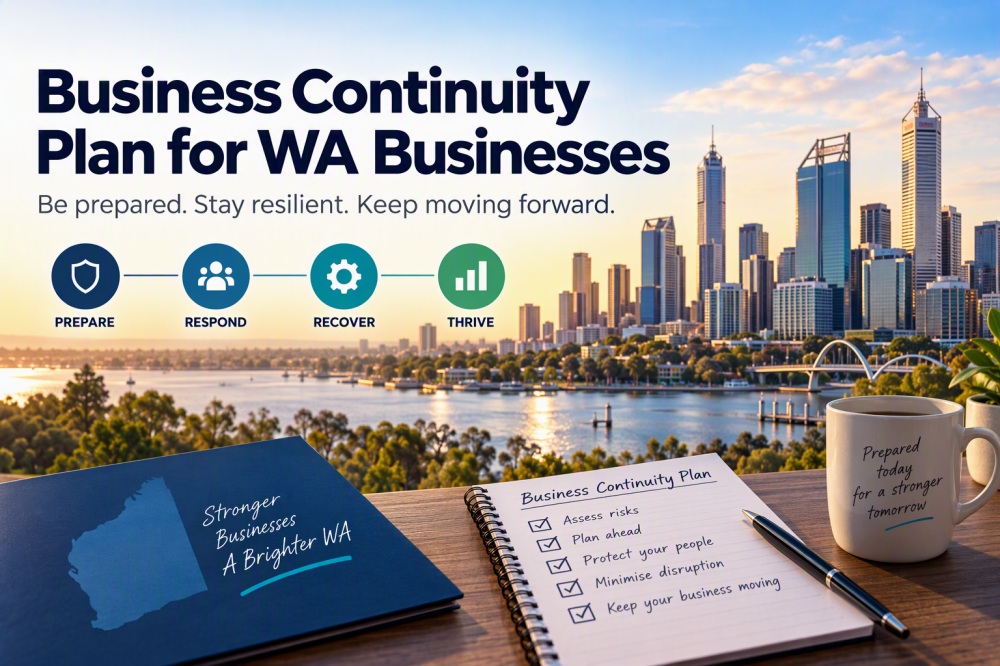
Today, businesses rely heavily on data and technology to operate efficiently. However, unforeseen events such as cyberattacks, natural disasters, or system failures can disrupt operations and lead to significant data loss. Think of backup and business continuity planning as your digital emergency evacuation plan.
Let’s explore why these elements are crucial for safeguarding your business.
Top-5 Backup Mistakes
- Relaying on a single location for backup data.
Stockpiling backups at your primary business site means you might be unable to recover them when the need arises, since they will likely be exposed to the same danger as your primary files. - Not verifying backup data works
Don’t make these data backup mistakes. Even small enterprises with limited resources should comprehensively test their backups regularly. - Trusting your production vendor is providing a backup.
Believing RAID on your server is a backup or the out-of-the-box software provides an adequate level of backup. - Allowing your production systems access to the backup system.
When the backup is online, available and able to be deleted, calamity is just a keystroke away - Single point failure. One backup system on one media.
If you use only one storage medium and then store that data in a single location, that opens the door to disaster.
Understanding Backup for Traditional On-Prem Systems
Backup refers to the process of creating copies of data to ensure it can be restored in case of loss or corruption. There are several types of backups, each serving a specific purpose:
- Full-Backup: A complete copy of all data. While comprehensive, it can be time-consuming and requires significant storage space.
- Incremental Backup: Only the data that has changed since the last backup is copied. This method is faster and requires less storage.
- Differential Backup: Copies all data changed since the last full backup. It strikes a balance between full and incremental backups
Understanding Backup for Modern Cloud Applications.
As the business world moves towards cloud applications (or workloads), there is a very different and specialist backup service required. The most common workload’s we see as a cloudapp is with-in the Microsoft 365 Software-as-a-service (SaaS) stack.
SaaS backup involves creating copies of data from SaaS applications and storing them in a secure location, typically another cloud service. This ensures that data can be recovered in case of accidental deletion, cyberattacks, or other disruptions. Unlike traditional on-premises backups, SaaS backups are designed to handle the unique challenges of cloud environments.
Implementing a robust backup strategy is essential for protecting against data loss and ensuring quick recovery in the event of a disaster.
Fault Tolerance. The Difference Between RTO, RPO and How This Will Impact You During A Restore.
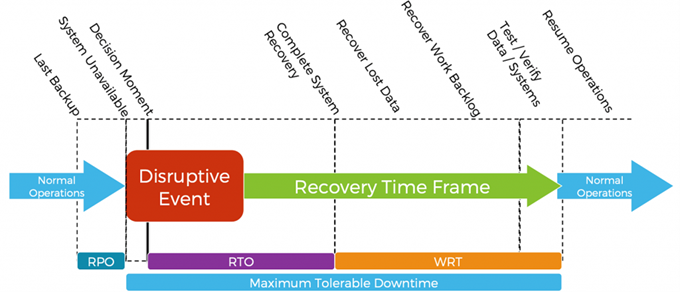
Recovery Point Objective (RPO) and Recovery Time Objective (RTO) are two of the most important parameters of a disaster recovery or data protection plan.
Recovery Time Objective (RTO) is the duration of time and a service level within which a business process must be restored after a disaster to avoid unacceptable consequences associated with a break in continuity. In other words, the RTO is the answer to the question: “How much time did it take to recover after notification of business process disruption? “
RPO designates the variable amount of data that will be lost or will have to be re-entered during network downtime. RTO designates the amount of “real time” that can pass before the disruption begins to seriously and unacceptably impede the flow of normal business operations.
The Role of Business Continuity
Business continuity involves planning and preparing to ensure that a company can continue operating during and after a disaster. It encompasses more than just data backup; it includes maintaining critical business functions and minimizing downtime. Key components of a business continuity plan include:
- Resilience: Developing business functions and infrastructures to withstand disruptions.
- Recovery: Setting up backup and recovery solutions for applications, systems, and networks.
- Contingency Planning: Identifying alternative processes and resources to maintain operations
Why Backup and Business Continuity Matter
- Minimizing Downtime: Effective backup and business continuity plans reduce the time it takes to restore operations, minimizing the impact on productivity and revenue.
- Protecting Data: Regular backups ensure that critical data is not lost, protecting against cyberattacks, hardware failures, and other threats.
- Maintaining Customer Trust: Demonstrating a commitment to data protection and operational resilience helps maintain customer trust and confidence.
- Compliance: Many industries have regulations requiring data protection and business continuity measures. Compliance with these regulations is essential to avoid penalties
Best Practices for Backup and Business Continuity.
Not all backups are alike. We encourage IT managers to take a robust approach to backup, beyond the traditional “hub and spoke” approach and adopt the 3-2-1-1-0 best practice. This will help your IT team sleep well at night knowing your data is secured.
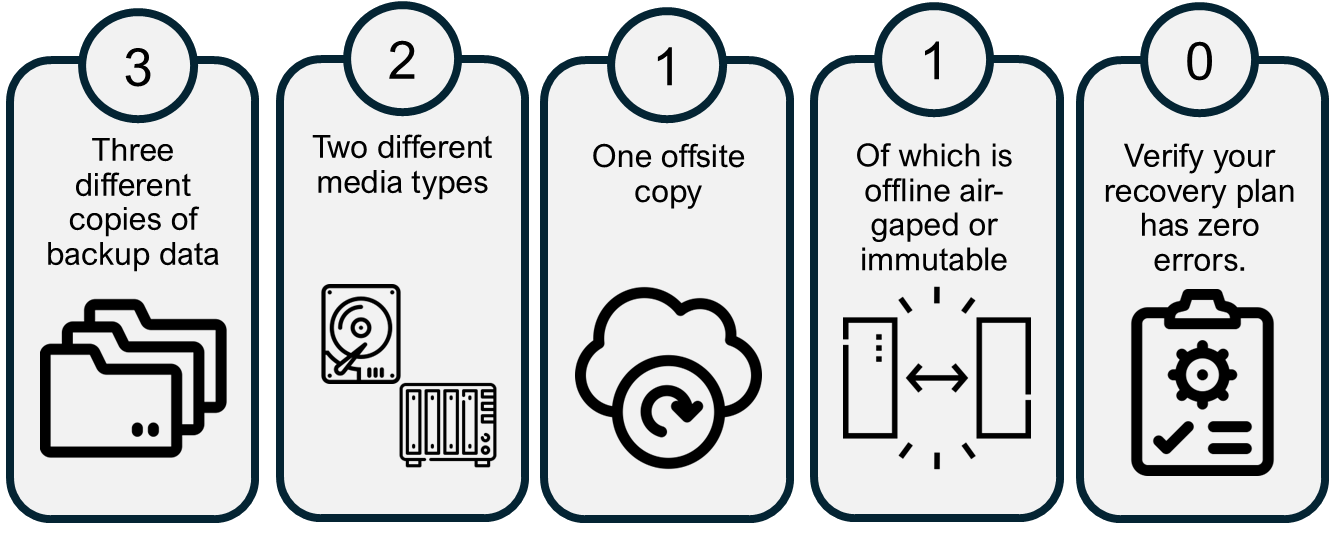
- Three Copies of Data: Ensure that you have three copies of your data, adhering to the traditional aspect of the rule.
- Two Different Media Types: Maintain data redundancy by using two distinct media types, but now, consider cloud storage as one of those options (i.e., snapshots on volumes and backups on object storage).
- One Copy Offsite: Have one copy of your data stored offsite, which can be effortlessly achieved with cloud backup solutions.
- One Copy Offline, Air-gapped, or Immutable: Acknowledge the importance of having one copy that is either offline, air-gapped, or immutable. This aspect is critical, especially in the context of ransomware protection, where an offline, air-gapped, or immutable copy can be a lifesaver.
- Zero Errors with Recovery Verification: Finally, ensure that your data is error-free by employing recovery verification, which can proactively identify and address potential issues with your backups.
Conclusion and Action Plan
By implementing robust strategies and regularly reviewing and updating them, businesses can safeguard their data, maintain trust, and comply with industry regulations.

- Who: Assemble your IT steering committee
Start by identifying the individuals who will be responsible for creating and execution. This team should include representatives from various departments, such as IT, HR, operations, and communications. - What: Conduct a Business Impact Analysis (BIA) on your App’s and systems
A BIA helps you understand the potential impact of disruptions on your business operations. Identify critical business functions and processes and assess the potential consequences of their interruption. - Why: Document the recovery process for your App’s and systems
Based on the BIA, develop strategies to recover and maintain critical business functions. This may include alternative work locations, backup systems, and communication plans. Consider both short-term and long-term recovery needs. - How: Develop “The Plan” (also referred to as a playbook)
Document the procedures and instructions your organization will follow during a disruption.- Scope and Objectives: Define the plan’s purpose and what it aims to achieve.
- Operations at Risk: Identify the business functions and processes that are most vulnerable.
- Recovery Strategy: Outline the steps to recover and maintain critical operations.
- Roles and Responsibilities: Assign specific tasks to team members and ensure everyone knows their responsibilities
- Implement and communicate “The Plan”
Ensure that all employees are aware of the Plan. Conduct training session and provide easy to access resources to help staff be aware of what to do. - Try to break The Plan and update accordingly.
Regular testing of the plan through simulations or “dry runs” to ensure it works as intended. Identity weaknesses, gaps and delays. As there will always be drift, due to thee updated within applications and systems. - Yearly reviews and maintenance of the Plan.
Yearly reviews and update to your plan is ideal. Business complying to international standards like SMB1001 or ISO27001 will be familiar with this need. It’s also a great practical way to keep this front of mind to ensure that the business can execute “The Plan” in a quick and effective way, when the time comes.